-10.png?w=1098&h=576)
A handheld GPS should answer a yardage question in a few seconds. The best model for you is not automatically the one with the most maps or tracking modes; it is the one you can carry, wake, read and put away without interrupting your routine.
Start with the broader golf GPS guide if you have not decided between an app, watch, cart unit or handheld. If a dedicated handheld already fits your round, use the checks below.
1. Readability before screen size
A larger screen can show more of the hole, but size alone does not guarantee quick reading. Compare brightness, contrast, font size, glare behavior and whether the most important distance is visible without opening another screen. A golfer who wants front-center-back numbers may prefer a simpler layout; a golfer planning around bunkers may value a touch map.
2. Map interaction
Ask what you can do with the map. Can you move a target point? See hazard carry and layup distances? Adjust the flag location? Return to the main yardage view with one action? More map detail is useful only when navigation stays predictable.
3. The Pocket-to-Pin test
Simulate one shot before buying or during the return window:
- Put the device where you will really carry it.
- Walk 30 yards, retrieve it and wake the screen.
- Find the center-green distance and one hazard.
- Lock the screen and store it again.
- Repeat while wearing a glove.
If the cycle feels awkward in a quiet room, it will not improve when your group is waiting. This test exposes button placement, screen timeout, glove response and carry friction better than a feature list.
4. Course coverage and updates
Do not stop at a large course-count claim. Verify your regular courses, how updates arrive, and how missing or changed layouts are corrected. A device may work independently during the round but still use an app for updates or score synchronization. Our planned guide to golf GPS without a phone explains that distinction.
5. Battery with a margin
Choose for your longest day. A claimed full-round runtime can be insufficient for a 36-hole event, travel delay or partially charged start. Screen brightness and interaction can change consumption. Use the golf GPS battery-life guide to build a realistic margin.
6. Carry system
Pocket, belt clip, lanyard and cart magnet serve different golfers. Walking golfers should consider weight, thickness and whether the screen can be protected from keys, tees and sand. Cart golfers should confirm that a mount remains visible but does not block controls or create a drop risk.
7. Dedicated device versus phone app
A handheld usually costs more upfront, but it isolates golf navigation from messages, camera use and phone battery. An app can be a better value when you already carry a power bank and do not mind handling the phone. Compare the full workflow in our golf GPS app versus handheld guide.
8. Only pay for features you will operate
Scorekeeping, shot tracking and statistics can be useful, but they require input. If you will not mark each shot or review the data after the round, those features should not decide the purchase. Prioritize the two questions you ask most often on the course.
A relevant MILESEEY option
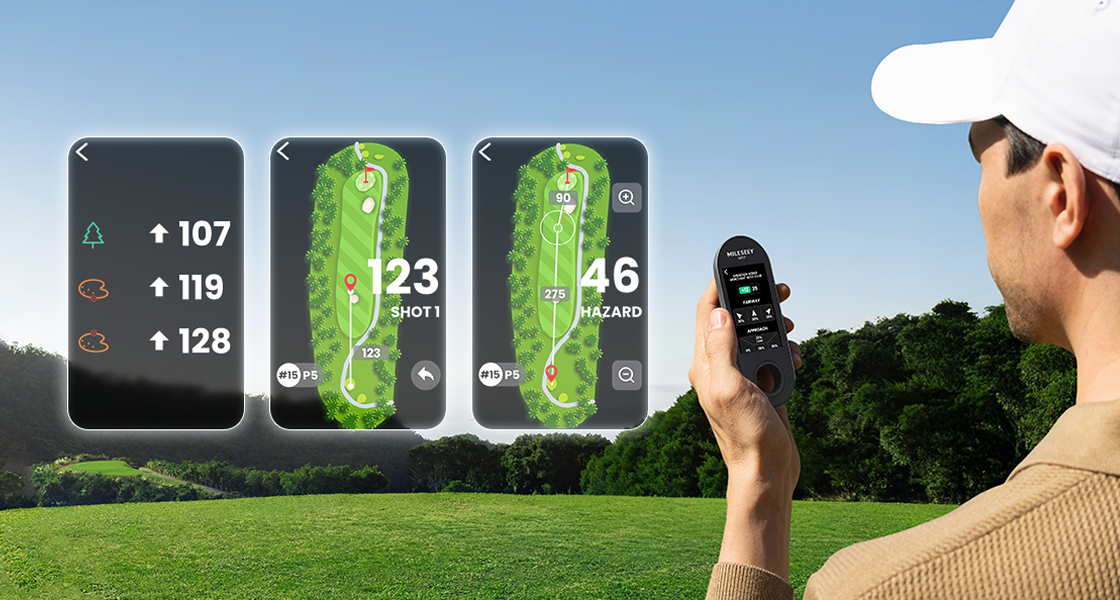
The golf GPS collection includes the MILESEEY GeneSonic Go Golf GPS Handheld. Official specifications list a 3-inch touchscreen, 43,000+ preloaded courses, 110 g weight, IP67 protection, a 1000 mAh battery, about three hours to charge and about 15 hours of operation. These are official specifications, not our independent test results.
When a handheld is not the right choice
Choose a watch if you want the fastest possible glance and accept a smaller display. Choose a cart unit if shared visibility matters more than pocket carry. Keep using an app if it already survives your round and causes no distraction. A direct laser may still be better for a visible flag when exact target distance is the main task.
Final checklist
- Verify regular courses and update method.
- Run the Pocket-to-Pin test.
- Check readability in sun and with a glove.
- Budget battery for the longest day.
- Confirm carry and screen protection.
- Count only features you will actually operate.