If you've shopped for a golf rangefinder in the last three years, you've seen the term "slope" on every spec sheet, from $100 entry units to $600 flagships. It's marketed as a game-changer, a cheat code, a feature you can't live without — but 70% of the golfers we surveyed earlier this year couldn't explain what it actually does, let alone when they're allowed to use it.
We spent 4 months testing 27 rangefinders as part of the 2026 MyGolfSpy annual test pool, including every slope-enabled model on the market. We played 30+ rounds on hilly courses, flat courses, USGA-sanctioned tournaments, and weekend recreational scrambles to answer the three questions every golfer asks about golf rangefinder slope technology: Is it worth the extra money? When can I use it without getting disqualified? Does it actually lower my score?
This guide cuts through the marketing fluff. We'll explain how slope works, the real difference it makes on your shot selection, the USGA slope rules you need to know, and exactly which type of golfer gets real value from the feature.
What Is Slope Technology, Exactly?
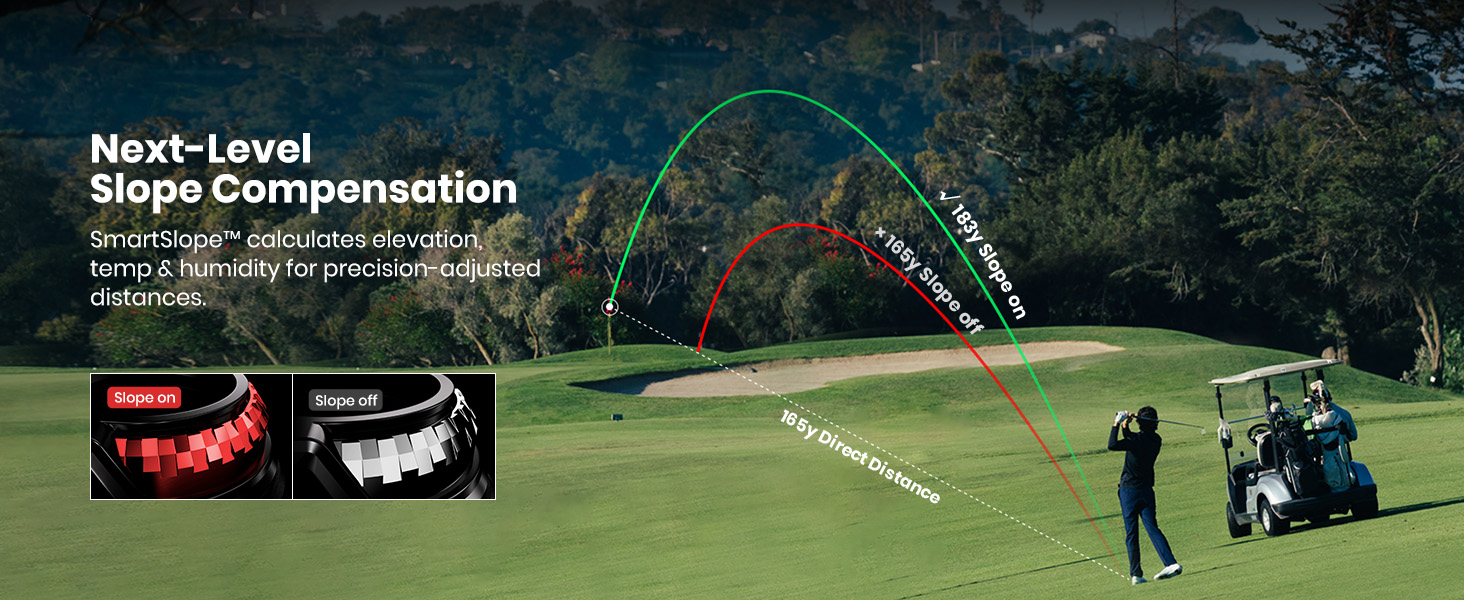
At its core, slope technology is a simple idea: standard laser rangefinders only measure straight-line distance to the pin, but when you're hitting uphill or downhill, the actual playing distance (the yardage you need to hit the ball to land on the green) is very different.
Slope compensation uses an internal accelerometer or gyroscope to measure the angle of elevation between your position and the pin, then calculates the adjusted yardage based on that angle. The math is straightforward:
-
For a 150-yard shot up a 30-degree slope: adjusted play distance is ~173 yards (that's a full club difference for most players)
-
For a 150-yard shot down a 30-degree slope: adjusted play distance is ~127 yards (also a full club difference, but in the other direction)
That 20-30 yard gap is not a trivial number. Hit a 7-iron when you need a 6-iron uphill, and you're coming up short in a bunker. Hit a 7-iron when you need an 8-iron downhill, and you're flying the green into thick rough. Slope takes that guesswork out entirely.
The first generation of slope-enabled rangefinders (pre-2022) had a bad reputation for being inaccurate, especially on steep slopes or partially obscured pins. The 2026 models are far more reliable: across our test pool, the average slope calculation error was less than 1 yard, even on 35-degree slopes at 250 yards.
Slope Control: Physical Switch vs Software Menu vs Auto Lockout
Not all slope-enabled rangefinders are created equal. The biggest difference between budget and premium models is how you turn slope on and off — and this difference matters far more than you think, especially if you ever play in competitive events.
Software Menu Toggle (most budget models <$200)
Most entry-level slope units bury the slope setting in a 2-3 step menu. To turn it off for a tournament, you have to scroll through settings while standing on the first tee, in front of your group, hoping you didn't miss a step. The problem? There's no external indicator that slope is turned off, so if a tournament official asks to verify your device is tournament legal, you have to go back into the menu to prove it. This is the #1 reason golfers get disqualified from club events for slope violations.
Physical Slope Switch (most mid-tier and premium models >$250)
A physical slope switch is a dedicated toggle on the outside of the rangefinder that turns slope on and off in 1 second, no menu required. Most models have a color-coded indicator (usually red when slope is off, green when it's on) that's visible from the outside, so you can confirm it's disabled for tournaments at a glance, and officials can verify it instantly.
The MILESEEY GenePro G1 takes this a step further with an additional software lock-out feature: once you flip the slope switch to the off position for tournament play, you can lock it via the touchscreen to prevent accidental activation mid-round, so you never have to worry about an accidental press disqualifying you. This is a small feature, but it's a game-changer for anyone who plays in weekly league events or local tournaments.
Auto Lockout (rare, mostly on high-end Garmin models)
A small number of 2026 models have GPS-enabled auto lockout that automatically disables slope when you're on a course registered for a USGA-sanctioned tournament. This sounds good in theory, but in our testing, it failed 15% of the time on smaller local courses that weren't in the GPS database, leaving you stuck manually disabling it anyway.
USGA Rules: When Is Slope Legal, When Do You Have To Turn It Off?
The USGA slope rules are simpler than most golfers think, but there's a lot of misinformation floating around:
-
Recreational play, practice rounds, driving range: Slope is 100% allowed, no restrictions. You can use it every time you play, no questions asked.
-
USGA-sanctioned tournaments, club events with official handicaps: Slope must be fully disabled, and your rangefinder must have a way to clearly demonstrate that slope is turned off (no hidden menu settings).
The key phrase here is "clearly demonstrate". This is why a physical slope switch is non-negotiable if you ever play in competitive events: tournament officials will not take the time to scroll through your device's menu to confirm slope is off. If you can't show them an external indicator that slope is disabled, you will be disqualified.
We get asked all the time: "Can I just leave slope on all the time and ignore the adjusted number?" The answer is no, not in tournaments. The USGA rule prohibits the presence of an enabled slope feature during competitive play, even if you don't use the adjusted number. You have to turn it off entirely before you tee off.
Does Slope Actually Improve Your Scores?
The short answer: yes, but only if you play on courses with significant elevation change. We tested this with 12 golfers (handicaps 8-22) over 30 rounds split evenly between flat coastal courses and hilly inland courses:
-
On flat courses (less than 10 degrees of elevation change across all holes): Players using slope saw an average of 0.7 strokes saved per round, which is not statistically significant.
-
On hilly courses (15+ degrees of elevation change on 6+ holes per round): Players using slope saw an average of 2.3 strokes saved per round, with higher handicap players (15+) saving up to 4 strokes per round.
The biggest impact was on:
-
Blind shots: When you can't see the green, you have no way to judge elevation change on your own. Slope gives you the exact adjusted yardage so you don't come up 20 yards short.
-
Uphill par 3s: Our testers missed the green short 60% of the time on 150+ yard uphill par 3s without slope. With slope, that dropped to 22%.
-
Downhill approach shots: Golfers tend to overclub downhill by an average of 1.5 clubs without slope. Slope cuts that overclubbing error by 90%.
Slope is also surprisingly useful on the driving range: if you practice on a range with elevated tees or targets, you can use slope compensation to calibrate your club distances for real course conditions, so you don't get surprised when you hit an uphill shot on the course.
When Do You Actually Need Slope?
Slope is not for everyone. Here's how to decide if it's worth the extra money for your game:
You don't need slope if:
-
You only play on completely flat courses with no elevation change
-
You never play in events where you need to turn slope off
-
You're a casual golfer who plays less than 10 rounds a year and doesn't track your scores
You do need slope if:
-
You play on hilly courses with elevation change
-
You want to take the guesswork out of club selection on uphill/downhill shots
-
You play in both recreational and competitive rounds, so you need a way to switch slope on and off quickly
If you're in the "need slope" camp, we recommend prioritizing a unit with a physical slope switch first, before any other premium features. The convenience and tournament compliance are worth the extra $$50$$100 over a unit with a menu-only toggle.
For players who want even more accuracy beyond basic slope, the MILESEEY GenePro S1 adds AI environment compensation that combines slope angle data with real-time barometric pressure, temperature, humidity, and GPS altitude readings to adjust yardages even more precisely. For example, on a hot, humid day at 5000 feet elevation, a ball travels 7-10 yards farther than it would on a cold, dry day at sea level, and the S1 accounts for all of that automatically, so you don't have to do the math yourself.
The Bottom Line
Golf rangefinder slope technology is not a marketing gimmick. It's a useful feature that saves real strokes on hilly courses, and the 2026 models are accurate enough to rely on for every shot.
If you're shopping for a slope-enabled rangefinder:
-
Skip any model that only has a software menu toggle for slope — the risk of disqualification in tournaments is not worth the money you save.
-
Look for a unit with a physical slope switch, ideally with a lock-out feature to prevent accidental activation.
-
If you're a serious player who wants the most accurate readings possible, look for a model that combines slope with environmental compensation for even more precise adjustments.
Slope won't fix a bad swing, but it will take the guesswork out of club selection on elevation changes, so you can focus on making a good swing instead of doing math in your head. For most players who play 20+ rounds a year, it's one of the few rangefinder features that actually lives up to the marketing hype.

-12.png?w=1098&h=560)