The MyGolfSpy 2026 test pool ran 27 rangefinders through a brutal side-by-side review. The MILESEEY GenePro G1 came out #1 Best Overall with a 9.8/10 score — the only unit to score a perfect 10 in the "extras" category. The numbers are public. You can look them up.
Numbers don't tell you what it feels like to use the wrong rangefinder for two years. They don't tell you about the par 3 you chunked because the unit locked onto a yardage marker, or the round you ruined at the 14th hole when the battery died. After enough rounds with enough different units, you start to notice the same five problems coming up over and over.
These are the five things I wish someone had told me before I bought my first one.
1. Flag Lock Drift — When Your $150 Rangefinder Locks the Wrong Tree
Picture a 160-yard par 3. The pin is straight ahead, slightly right. There's a tree about 15 yards left of the green. You pull out a budget rangefinder, scan the green, and get a reading: 168 yards.
You swing for 168. The ball flies to 168. It lands pin-high left. In the bunker. Wait, the bunker is left of the green, and you landed in the bunker left of the green, but your reading was 168 and you hit to 168...
You check the scorecard later. The actual pin position was 162. The rangefinder had locked the tree.
This is flag lock drift, and it's the single most common problem in the budget tier. The unit's PinSeeking algorithm is supposed to ignore anything but the closest target, but cheaper optics and weaker processors struggle when there's clutter — trees, flagsticks in adjacent greens, signs, even yardage markers. The MyGolfSpy 2026 review called this out specifically: sub-$200 units showed a measurable rate of false locks, and a single false lock costs you 2-3 shots every time it happens.
What to look for: a unit with a confirmed first-time lock rate. The GenePro G1 is one of a handful of 2026 models that scored full marks in lock accuracy. If you can't find a test review that specifically mentions "first-time lock," assume the worst.
2. Optics That Shake — Why 150 Yards Is the Real Test
Every rangefinder on the shelf says it ranges to 1,000 yards. Most do — to a barn door. The real question is: at what distance can you actually see the flag clearly enough to lock it?
On a calm day, 100 yards is easy. At 150 yards, the lens magnification starts to matter. At 200 yards in low light, you need good lens coatings and at least 6x magnification to make out a pinstick in a tucked position. Cheap optics look fine in the pro shop. In the field, at sunset, they're mush.
The MyGolfSpy 2026 test scored the top laser at 21.5 out of 22.5 on optical quality. The half-point deduction was for slightly soft edges at extreme distance — basically nitpicking. The units that scored 18 or below had visible issues: poor low-light performance, chromatic aberration around the pin, focus problems with glasses.
The 150-yard test matters because that's where most approach shots land. If you can't lock a pin at 150 yards in flat light, you can't trust your numbers on a 145-yard shot that actually matters.
A quick way to test in the store: hold the unit at arm's length and try to read a price tag 20 feet away. If the edges look soft at 20 feet, they'll be soft at 200 yards.
3. Slope Compensation — The Hidden 5-7 Yard Miss Most Golfers Don't Know They Have
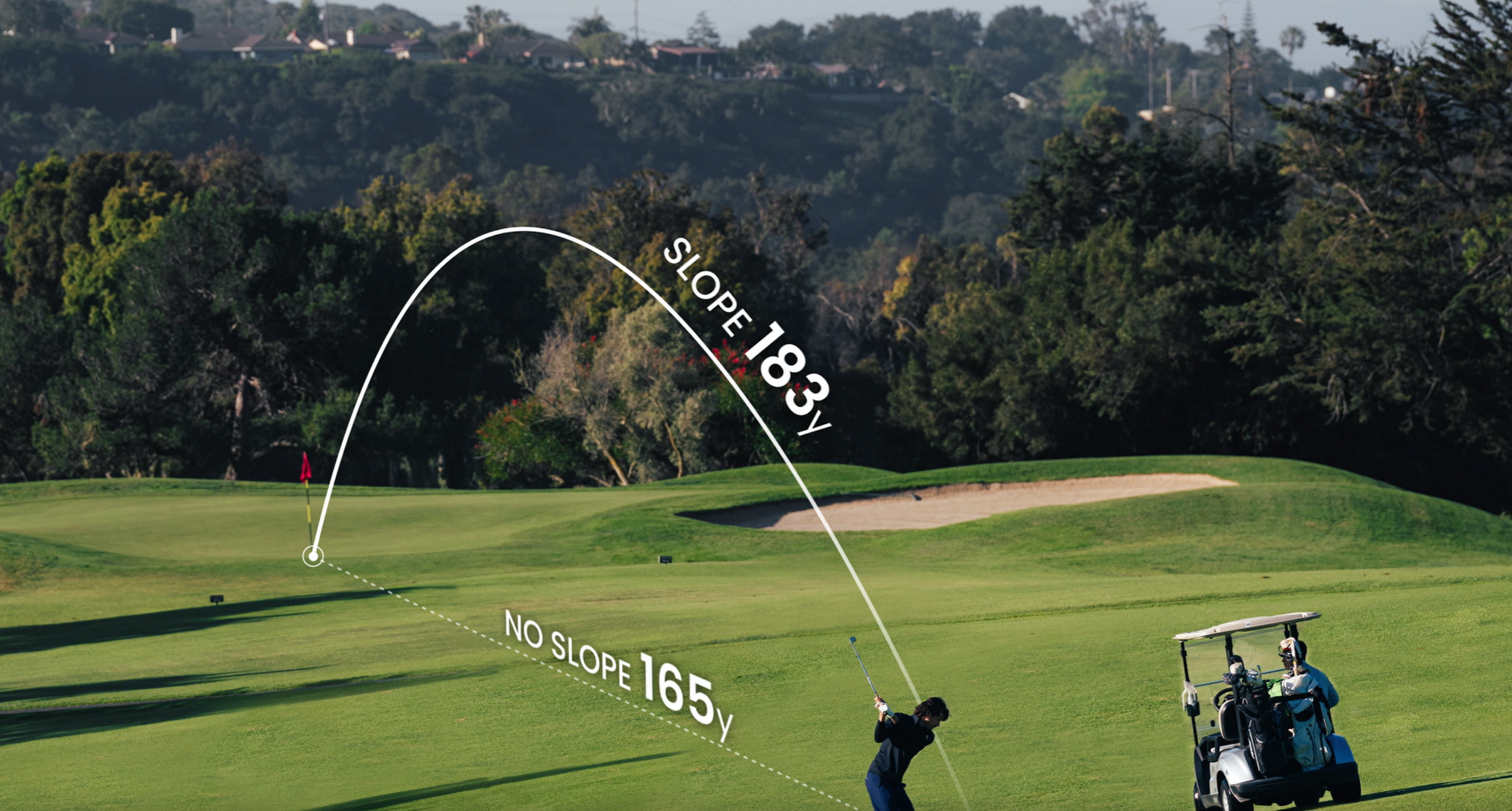
You hit a 130-yard shot to an elevated green. You read 130 on your laser. You swing for 130. The ball lands 12 yards short. You walk up to find the pin was 142 yards of "play" distance, even though the actual line-of-sight was 130.
This is slope compensation, and it's the biggest hidden number in golf. An elevated green plays longer. A downhill shot plays shorter. A flat-feeling shot into a 5-degree downslope might fly 7 yards past your line-of-sight reading.
Most mid-range and premium rangefinders now include a slope mode that calculates this for you. The trick is the slope toggle — a physical switch that turns it off. USGA rules require slope to be off during tournament play. Some events check. Most don't. If you ever play in a competitive round and your unit is stuck in slope-on mode, you can be disqualified.
The MyGolfSpy 2026 review dinged several sub-$300 units for either missing slope mode entirely or having a buried menu toggle that golfers couldn't find. Don't buy a rangefinder with a slope mode you can't turn off with one hand and one glance.
4. Course Maps — Why the Flag Number Is Half the Story
You're on a par 5. 480 yards. You crush your drive 270 down the middle. Now you need to decide: layup short of the creek at 220, or go for it?
Your rangefinder tells you the creek is 245 yards from your ball — and that's it. The number alone doesn't tell you how far you carry it, where the safe layup zone is, or whether the green is reachable.
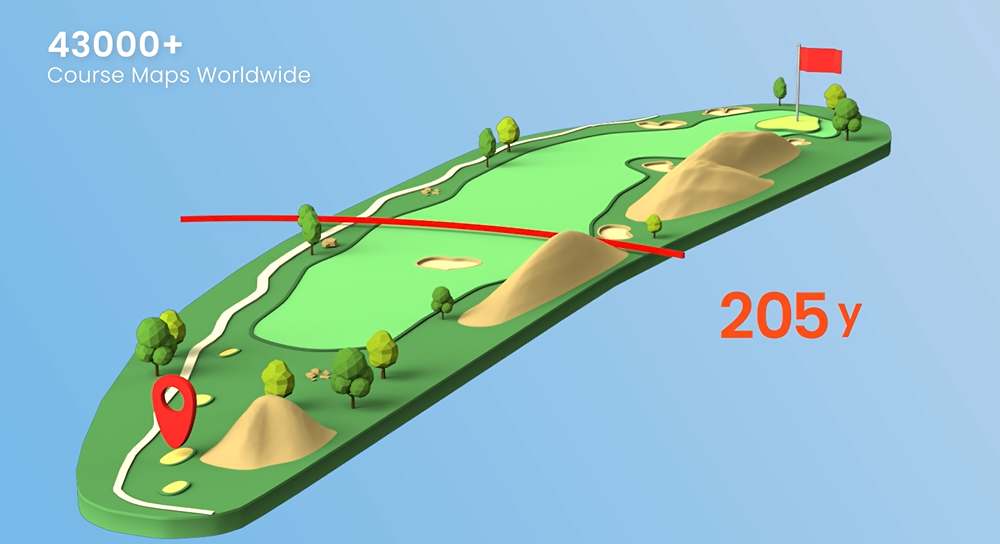
This is where GPS course maps earn their place. A good GPS layer shows the entire hole: fairway shape, hazards, layup zones, green contours. Combined with a precise laser reading, you get both the "where am I" and the "where should I go."
The catch: course maps need updates. A GPS unit with a 2-year-old database might show a bunker that was removed, or miss a new hazard. The MyGolfSpy 2026 review specifically scored the GenePro G1 a perfect 10/10 in the "extras" category — which includes GPS course database quality, update frequency, and integration. Most 9.0+ scorers in the pool only managed 7-9 in this category, which is where the real difference between cheap and premium rangefinders lives in 2026.
If you play the same 2-3 home courses every week, GPS maps are nice to have. If you travel for golf, play in corporate outings, or are members at a club that hosts outside tournaments, GPS maps are the difference between playing the hole and guessing at the hole.
5. Battery Anxiety — The 17th Hole Problem
You're on the 17th tee. Par 3, 175 yards over water. You flick your wrist for the yardage. The screen is dark. You forgot to charge your GPS watch.
You have three options: guess and hit a club, walk back to the cart for a charged unit (if you have one), or just hit a 7-iron and hope. None of them are good.
This is battery anxiety, and it's a uniquely 2026 problem because the rise of rechargeable GPS devices has coincided with longer rounds (5+ hours with a cart, 4+ walking) and heavier use. The MyGolfSpy 2026 review found that even the best GPS watches in the pool needed a charge every 1-3 rounds depending on mode usage.
A laser rangefinder with a CR2 battery sidesteps this entirely. A single CR2 lasts 3,000-5,000 actuations — roughly 3-6 months of regular play. The cost per battery: $5-8. The cost of a sleeve of balls you might lose from guessing yardages on holes 17 and 18: $20+.
If you have a rechargeable GPS device, get a power bank for your bag. If you're buying new in 2026, the units with replaceable batteries — like CR2-powered lasers — have a real-world edge on the back nine.
The five problems above aren't abstract. They're in every review of every rangefinder pool, every year. They're also the reason the GenePro G1 sits at the top of the 2026 MyGolfSpy rankings — not because the score is high, but because each of these failure modes is what separates a 9.0+ score from a 9.8.
If you're buying your first rangefinder, save yourself the two-year learning curve. Test the unit on the problems above before you buy. The score on paper is just a number. The score on the course is your handicap.